

WooCommerce Marketplace Multicurrency plugin allows your shop to display prices and accept payments in multiple currencies. This will grant your customers the possibility of shopping in their favorite currency, thus increasing conversions.
This plugin will allow the admin to configure as many as currencies to the store as per the choice. (WooCommerce Marketplace Multicurrency) Such currencies will then appear in a list, displayed at the frontend for the users. The users can use to select in which currency they would like to see the prices, as well as complete transactions in such currency.

The admin can add New Currencies after clicking on the Add New button as shown below image:

After, the admin can click on the Settings option and change the General settings for the Currency as shown below image:
The store owner can also set default currency as per the choice. For this, the admin will click on the “here” link.
The admin can enable/disable the status to select Multicurrency option.

All the configured currencies will be visible on the front end for the customers.
Note: The configured currencies and their exchange rate settings will be applicable to all the store products automatically.

Even, the admin can set any desired currency as the default currency from the “Currency options”. And accordingly, the admin will change the exchange rates for different currencies based on the new default currency.
The exchange rate calculation for different currencies will be based on the default currency for weight 1 always.
The store website displays the prices in the default currency. The customers can select in which currency they would like to see the prices from the available drop-down list as per the image.

The store website will then displays the prices in the selected currency as per the image.
After this, the customer can proceed to checkout as per the image.
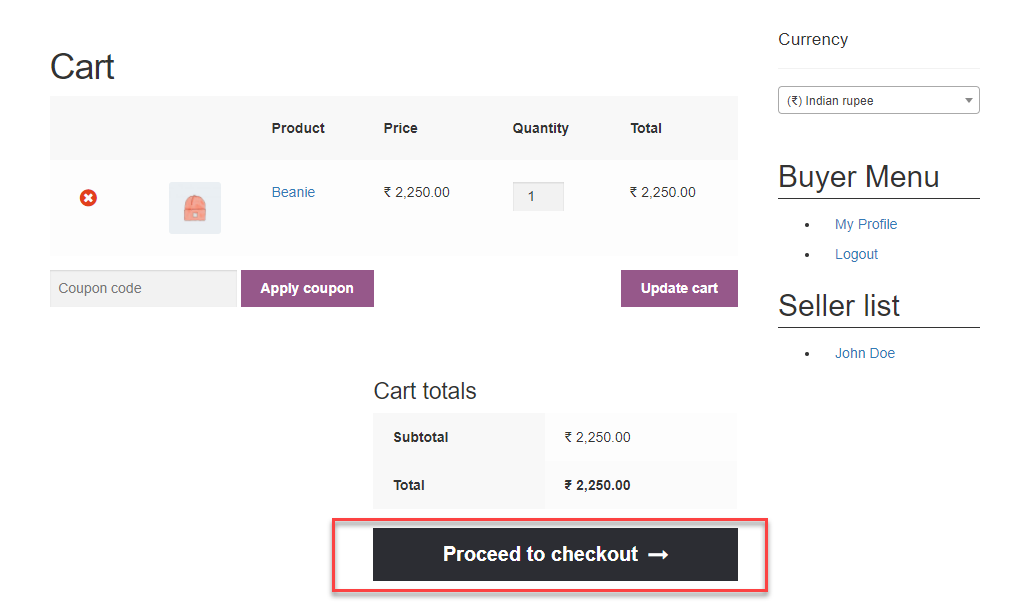
And then will place the order as per the image.

The shoppers can see the order price in the selected currency on the “Order Received” page as per the image.

At the front, the marketplace multicurrency widget will work on:
The seller can see a tab Multi-Currency in the seller panel as per the image.

The seller can view the store currency information added by the admin by clicking on the Multi Currency option as per the image.
On the product edit page, the seller can see the Multi Currency tab as per the image.

The seller will see the currency exchange rate fields when clicking on the Multi Currency tab as per the image.

Here, the seller will set the exchange rate equivalent to the base currency.
Store website display products price in the default store currency. For product “Hoddie” price value in USD is $100. link

The default Indian exchange rate has been set as Rs 45 for $1. Therefore, product price in the Indian currency before updating the exchange rate equivalent to the base currency for the product “Hoddie” is Rs 4,500.
That’s all for the WordPress WooCommerce Marketplace Multi-Currency plugin. Still, have any issue, feel free to add a ticket and let us know your views to make the plugin better at webkul.uvdesk.com


